
Your CI/CD pipeline is automated. Tools like GitHub Actions, GitLab CI, Jenkins, or AWS CodePipeline trigger builds, tests run automatically, and applications are deployed to cloud platforms.
So why are releases still taking longer than expected?
For many engineering teams, the problem isn't a lack of automation. It's the bottlenecks hidden within the software delivery process. Long build times, inefficient test cycles, manual approvals, late security checks, inconsistent environments, and risky database migrations can all slow releases-even when CI/CD is in place.
The reality is simple: automation alone doesn't guarantee faster software releases.
1. You're Automating an Inefficient Process
CI/CD tools can automate builds and deployments, but they cannot fix an inefficient workflow. If every release involves unnecessary test runs, multiple manual handoffs, or repeated approval steps, automation simply makes the same slow process repeatable.
The first step in CI/CD pipeline optimization is identifying where time is actually lost. A faster pipeline starts with improving the workflow-not simply adding more tools.
2. You Aren't 'Shifting Left' Across Environments (Dev, UAT, Prod)
Catching bugs or security vulnerabilities in production or UAT is expensive and slow. A fast CI/CD pipeline relies on an environment promotion model and a 'Shift-Left' approach.
This means moving security and code-level testing to the earliest possible stage (Dev) so issues never reach later stages. However, each environment serves a specific purpose:
- Dev: Fast checks like linting, unit testing, SAST (static code analysis), and SCA (dependency scanning).
- UAT: Heavier checks like integration tests, End-to-End (E2E) user testing, DAST (dynamic security scanning), and performance testing.
- Prod: Smoke tests, automated health checks, and continuous monitoring.
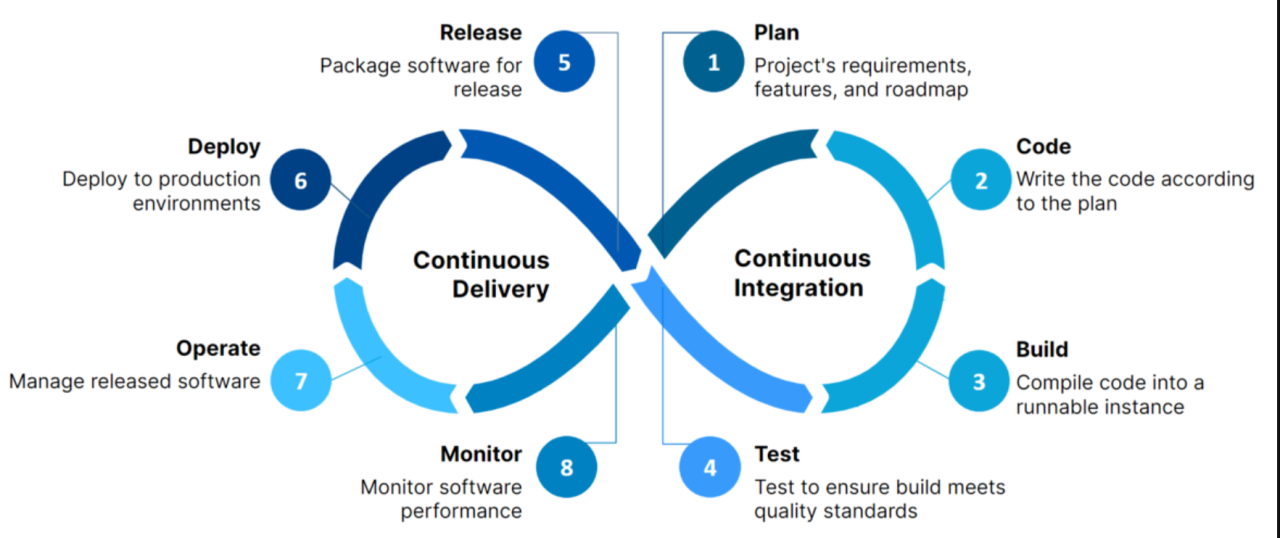
3. Your Build and Test Cycles Are Too Slow
Developers need immediate feedback. If every pipeline runs a 20-minute test suite for a minor text change, delivery speed plummets. To reduce pipeline execution time, you need smart standard practices:
- Fail Fast Design: Put your fastest checks (linting, basic unit tests) at the beginning. If they fail, the pipeline stops immediately, saving time and compute resources.
- Parallel Execution: Do not run jobs sequentially if they do not depend on each other. Run linting, unit testing, and SAST simultaneously.
- Smart Triggering (Path Filtering): Configure pipelines to only run tests for the code that actually changed. If a frontend component updates, skip backend database tests.
- Aggressive Caching: Cache package dependencies (e.g., node_modules) and use multi-stage Docker builds to cache intermediate image layers.
- Nightly vs. Commit Runs: Run fast tests on every developer commit. Reserve heavy, time-consuming tests for nightly runs or merges to UAT.
4. Manual Steps and Risky Database Migrations
A pipeline may be automated, but the release process often still depends on people for manual verification or database migrations. Database changes are notoriously tricky. Automating schema migrations using tools like Prisma, Liquibase, or Flyway is useful, but highly risky if migrations are not backward-compatible. Teams must adopt an 'expand-and-contract' pattern for database changes to ensure automated deployments are safe. If a new deployment fails, the old code must not break against the new database schema.
5. Missing Environment Parity and Rollback Strategies
If your Dev environment has a different configuration than UAT or Prod, code that passes in Dev will inevitably break later. This defeats the purpose of your pipeline. Use Infrastructure as Code (IaC) tools like Terraform or Pulumi to ensure Dev, UAT, and Prod environments are functionally identical.
Furthermore, fast deployment is only useful when you can release with confidence. Techniques such as blue/green deployments, traffic splitting, and progressive canary rollouts allow teams to validate a new version before completing the rollout. Combined with automated health checks, these strategies provide a clear, automated rollback path if issues are detected, enabling zero-downtime releases.
Faster Releases Require the Right DevOps Architecture
A high-performing CI/CD pipeline is more than a collection of tools. A modern, cloud-agnostic stack might include:
- CI/CD: GitHub Actions, GitLab CI, Jenkins, Azure DevOps
- Containers & Infrastructure: Docker, Kubernetes, Terraform, Pulumi
- Database & ORM: PostgreSQL, Prisma, Liquibase, Flyway
- Security: HashiCorp Vault, SCA, SAST, DAST, OIDC/Workload Identity
- Release Strategy: Canary Rollouts, Blue/Green Deployments, Automated Health Checks
How Upperthrust Can Help
At Upperthrust Technologies, our DevOps Consulting and DevSecOps services help businesses design and improve CI/CD pipelines, automate software delivery, integrate security, and build scalable cloud environments. Explore our DevOps & DevSecOps solutions and get in touch with our team.
Book a free 30-minute consultation with our engineering leads.